Expedite Your Workflow.

WorkFlo Apps builds precision tools and plugins for MEP fabrication detailers. Each one comes from a real bottleneck in detailing — automating layout, dimensioning, numbering, support modeling, and the file housekeeping that quietly eats your day. No theoretical features, just the niche, specialized utilities a detailer actually reaches for, all built on the Autodesk Fabrication API.

Model more in less time.

Our newest tool, Model GPS, is live and free on the Autodesk App Store — it keeps the room, ceiling height and nearest column grid on screen while you navigate Navisworks. Further down, a free browser tool that repairs old family type catalog files for Revit 2021 and newer.

Revit 2021+
Type catalog ready
100% local
Files never leave your browser
Free
No account — just your email
Model GPS icon

Model GPS

Navisworks will tell you everything about a model except the one thing you keep asking on a coordination call: which room am I in? Model GPS docks in Navisworks and answers it continuously as you navigate.

Room
The name, number and level you are currently inside. It keeps reporting the room even when the camera rises into the plenum above the ceiling — which is exactly where MEP coordination happens, and exactly where you would otherwise lose your bearings.
Ceiling
Clear height above finished floor to the ceiling over your head, plus its type, assembly and thickness.
Grid
The nearest column grid intersection — the way people actually call out a location on a call.
Go to location
Type a room number, a room name or a grid reference and the camera flies straight there.
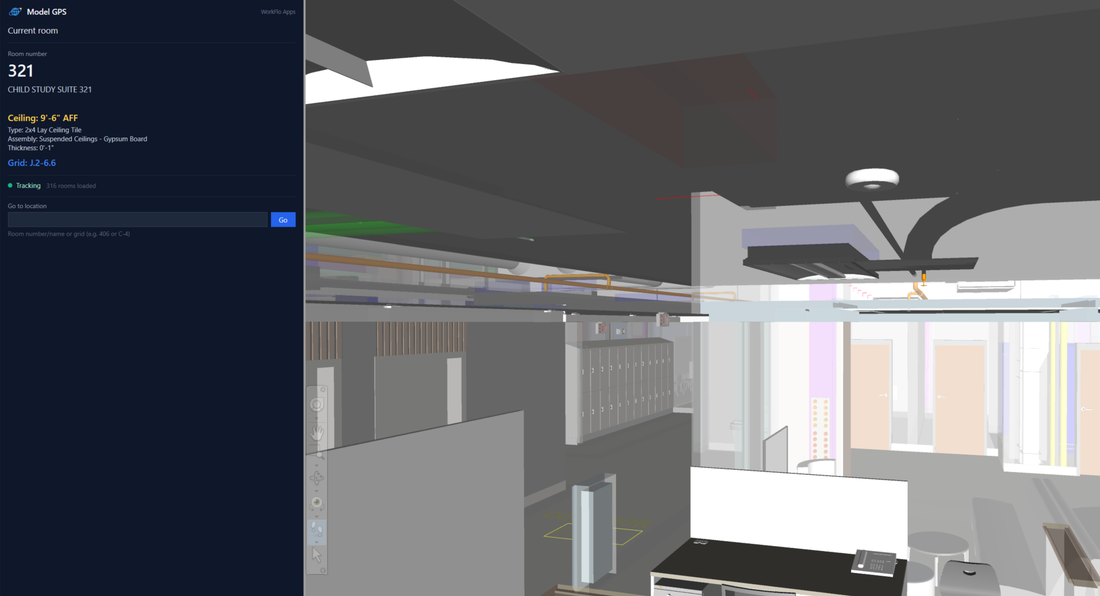
The Model GPS panel docked in Navisworks showing room 321, ceiling 9 feet 6 inches above finished floor, and grid J.2-6.6
🔒 Read-only — Model GPS never modifies, saves or exports your model
2020–2027
Navisworks Manage & Simulate
Free
No licence, no account
Read-only
Never writes to your model

Model GPS reads rooms, ceilings and grids out of the model, so that data has to be present — for Revit models this means exporting with room geometry turned on. Where a piece of data is missing the panel says so rather than guessing. Navisworks Freedom cannot load add-ins.

Family Type Catalog Converter

Our published plugins live on the Autodesk App Store — but we didn't want you to leave empty-handed. Thanks for stopping by our little corner of the internet; here's a small token of appreciation, free to use and running entirely in your browser.

You've probably bumped into this annoying issue yourself — we sure have. Rather than fight it every time, we found a quick way around it so we could get back to modeling, and turned that into the tool below. It's just one of the many little snags that crop up while you work — now it's one less.

Revit 2021 renamed dozens of unit keywords in its database. Type catalog text files written for Revit 2020 or earlier now throw errors when you load the family. Drop your old catalog files here and this tool rewrites the outdated unit keywords to their Revit 2021+ names — instantly, right in your browser.

🔒 Your file is converted on your device — your file is never uploaded
Drop your type catalog file(s) here
or click to browse  ·  .txt files  ·  multiple files OK

Heads up: run this on pre-2021 catalog files. A converted file uses the new unit names, so it will no longer load in Revit 2020 or earlier. The tool only changes unit keywords it recognizes — everything else in your file is left exactly as-is.

🔖 Found this handy? Add us to your bookmarks and visit again — we'll always be putting out small, free tools to help with the daily grind.

Common Questions

What error does this fix?

If a family won't load in Revit 2021 or newer and you see Invalid column unit type, or the type catalog is quietly ignored, it's almost always because Revit 2021 renamed dozens of unit keywords. Older catalog .txt files still use the old names, so Revit rejects them.

→ Full guide: fixing the “Invalid column unit type” error in Revit 2021+

Which Revit versions does it work for?

The fixed file loads in Revit 2021, 2022, 2023 and 2024+. The breaking change happened in 2021 and the new names carry forward, so one conversion covers all of those versions.

What exactly does it change?

Only the outdated unit keywords in the header row — for example GALLONS_US_PER_MINUTEUS_GALLONS_PER_MINUTE, or POUNDSPOUNDS_FORCE. Everything else in your file is left exactly as it was. The mapping matches Autodesk's official list of changed identifiers.

Is my file uploaded anywhere?

No. The conversion runs entirely in your browser — your catalog file never leaves your computer.

Will the converted file still work in Revit 2020?

No. It uses the new Revit 2021+ unit names, so run it on the pre-2021 catalogs you're upgrading — not on files you still need in Revit 2020 or earlier.

Be first to get our next tool

We're always building small, free Revit Fabrication tools. Drop your email and we'll let you know when the next one ships — no spam, unsubscribe anytime.

Ready to Streamline Your Workflow?

Have a question about a tool, need a custom utility, or want to discuss your fabrication workflow? Reach out directly.

info@workfloapps.com